Website Redesign Checklist for Growing Companies
Avoid costly traffic losses during a website redesign with this essential checklist covering SEO, AI visibility, and migration planning.

A mid-sized SaaS company launches its redesigned website after three months of work. The new design is clean, the brand refresh looks sharp, and leadership signs off. Then the traffic reports come in. Organic visits down 35% in six weeks. Rankings that took two years to build, gone. Not because the design was bad. Because nobody ran a proper checklist before flipping the switch.
Research confirms that website redesigns without proper SEO planning result in organic traffic losses ranging from 30% to 70%. In 2026, the risk is compounded by a second layer most teams are not accounting for: AI crawlers from ChatGPT, Perplexity, Claude, and Gemini are now actively indexing the web, and a poorly structured redesign can lock them out just as easily as it breaks traditional SEO.
This website redesign checklist is built for teams that want the new look without the traffic setback. It covers pre-launch preparation, SEO protection, AI crawlability, and post-launch recovery, in that order.
The Website Redesign Checklist Starts Here: The Pre-Redesign Audit You Cannot Skip
Most redesign disasters are not design failures. They are planning failures. Before any wireframe gets drawn, a company needs a full picture of what currently exists and what is currently working. Skipping this step is like renovating a building without knowing which walls are structural.
A documented case from Encodedots shows a SaaS company that switched CMS without redirects and lost 58% of organic traffic in the first 30 days because Google treated the new site as a brand new domain. Think of this audit as step zero of your website redesign checklist. The part that makes every other step actually work.
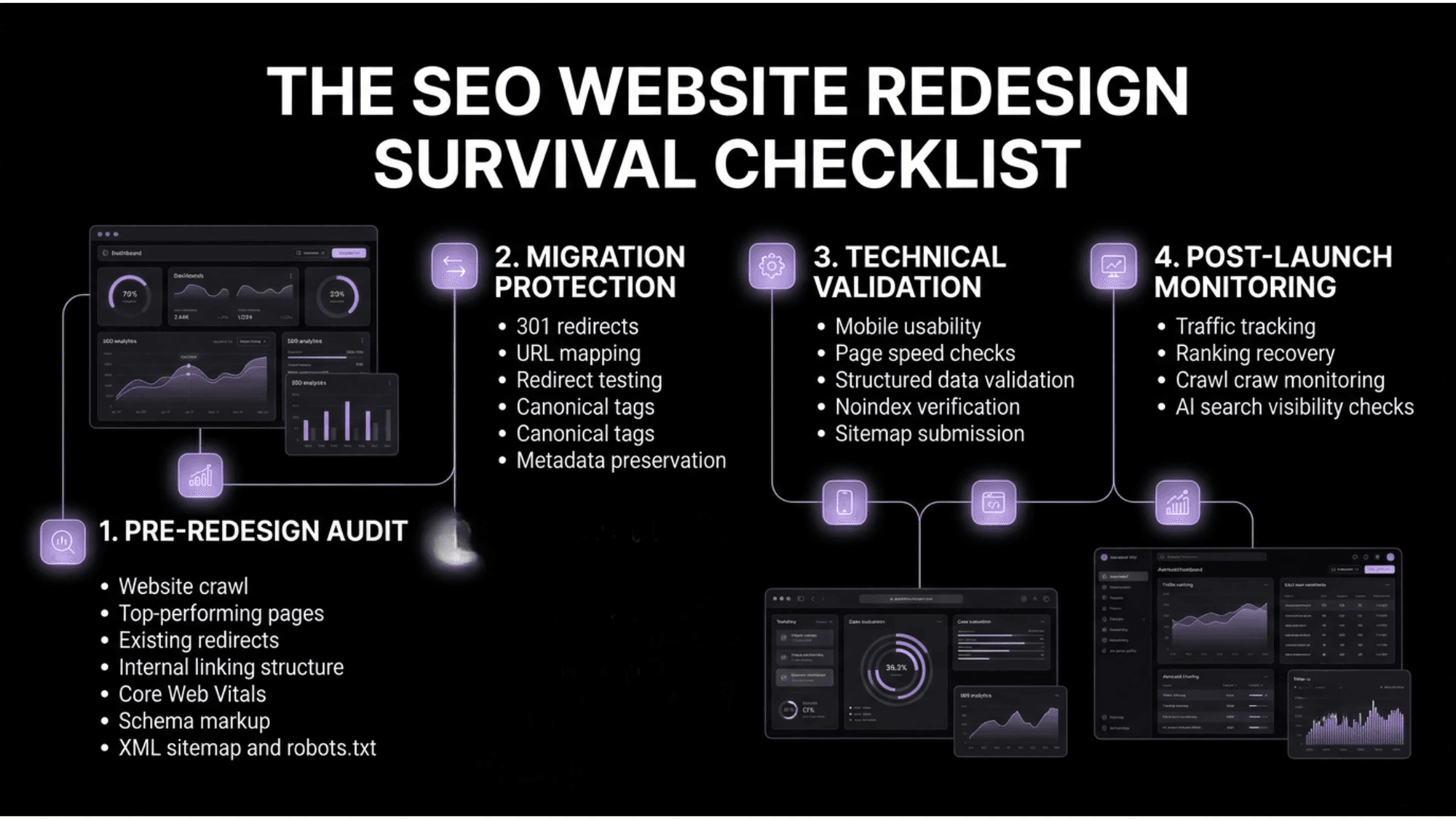
Every item below is what you need to document before the redesign starts, as each one can break silently during the process and only becomes visible weeks later in declining traffic reports:
-
Full crawl of the existing site using Screaming Frog or Sitebulb: capture every URL, status code, and redirect currently in place
-
Top-performing pages by organic traffic, ranked keywords, and backlink count: these are your highest-risk assets
-
All existing 301 redirects already deployed: losing inherited redirects is one of the most common migration errors
-
Internal linking structure and why that architecture matters for link equity distribution
-
Page load speeds, Core Web Vitals scores, and mobile usability benchmarks as your pre-redesign baseline
-
Schema markup currently deployed: this rarely migrates automatically and rarely gets checked
-
Sitemap and robots.txt: export both before anything changes
Not all pre-audit data carries equal weight. The table below organizes every data point by priority level so your team knows exactly where to focus first and what cannot be skipped under any timeline pressure:
|
Priority |
Data Point |
Tool |
Why It Matters |
|
Critical |
Full URL inventory with status codes |
Screaming Frog |
Foundation of redirect mapping |
|
Critical |
Top organic pages and keyword rankings |
Search Console, Ahrefs |
Identifies highest-risk pages |
|
Critical |
Backlink profile by URL |
Ahrefs, Semrush |
Prevents link equity loss |
|
High |
Existing 301 redirects |
Screaming Frog |
Avoids breaking inherited redirects |
|
High |
Core Web Vitals baseline |
PageSpeed Insights |
Benchmark for post-launch comparison |
|
Medium |
Schema markup inventory |
Schema Validator |
Schema rarely auto-migrates |
The SEO Checklist for Website Redesign: What Must Survive the Build
A redesign that changes URL structures, consolidates pages, or rewrites navigation without an SEO plan erases organic gains that took years to accumulate. The SEO checklist for website redesign below is what keeps rankings intact when the new site goes live.
URL Structure, Redirects, and Link Equity Preservation
URL changes are the single biggest SEO risk in any redesign. When a URL changes without a proper 301 redirect, every backlink pointing to that old URL becomes worthless overnight. Google has confirmed that 301 redirects pass nearly all link equity to the destination URL. A missing redirect passes zero. This redirect mapping step is the most critical item on any SEO checklist for website redesign.
The following steps must be completed in sequence before launch, not distributed across the project timeline and reassembled at the end.
-
Map every old URL to its new equivalent before launch, not after
-
Use 301 permanent redirects, not 302s: 302s do not pass full link equity
-
Avoid redirect chains longer than one hop: each additional hop dilutes equity
-
Test every redirect in staging by crawling the full redirect map, not spot-checking
-
Update all internal links to point directly to new URLs
-
Submit a new XML sitemap to Google Search Console immediately after launch
Metadata, On-Page Signals, and Content Migration
Metadata does not migrate automatically. Title tags, meta descriptions, H1 tags, and alt text all need to be manually verified or exported before the redesign and confirmed after. A CMS switch makes this doubly risky because the import process frequently strips or resets fields that look correct in the editor but render incorrectly in the live environment.
The following on-page elements require manual verification after every migration. Treating any of them as a QA afterthought is one of the most reliable ways to lose rankings that took months to earn as part of your SEO website redesign checklist:
-
Export all title tags and meta descriptions before the redesign begins
-
Verify H1 tags are present and unique on every page post-launch
-
Confirm canonical tags are correct, especially on pages with multiple versions
-
Check that image alt text carried over for product pages, blog posts, and landing pages
-
Verify structured data is still present and valid using Google's Rich Results Test
-
Confirm no pages were accidentally set to noindex during staging
The table below maps each on-page element against its pre-launch documentation requirement and its post-launch confirmation check, giving every team member a clear before-and-after reference with no room for assumption:
|
Element |
Pre-Launch Status |
Post-Launch Check |
Tool |
|
Title tags |
Exported to a spreadsheet |
Match confirmed page by page |
Screaming Frog |
|
Meta descriptions |
Exported to a spreadsheet |
Match confirmed page by page |
Screaming Frog |
|
H1 tags |
Documented |
Present and unique on every page |
Screaming Frog |
|
Canonical tags |
Documented |
Correct on all versions |
Screaming Frog |
|
Image alt text |
Documented |
Present on key pages |
Screaming Frog |
|
Schema markup |
Inventory complete |
Valid and present post-launch |
Rich Results Test |
|
Noindex status |
Staging confirmed noindex |
Live site confirmed index |
Search Console |
AI Crawlability Audit Checklist Before Website Redesign
In 2026, a website will not just be read by Googlebot. According to Alli AI's analysis of 78,000 pages, AI crawlers, including ChatGPT-User, GPTBot, ClaudeBot, and PerplexityBot, are now making 3.6 times more requests than traditional search crawlers. A redesign is when robots.txt gets rewritten, JavaScript frameworks get swapped, and page structures change. Each decision can inadvertently lock out the AI systems responsible for how your brand gets discovered and cited.
This website redesign checklist must now include an AI crawlability audit checklist before website redesign. Complete these checks in staging before launch and confirm again within 48 hours of going live.
The following apply regardless of industry or platform. A logistics company and a SaaS product face identical AI crawler eligibility requirements.
-
Confirm robots.txt does not block GPTBot, OAI-SearchBot, ChatGPT-User, ClaudeBot, PerplexityBot, or Google-Extended unless intentionally
-
Verify structured data covers key page types: Article, FAQPage, HowTo, Product, and BreadcrumbList
-
Ensure content answers questions in clear, direct paragraphs: AI engines extract from the clearest answer, not the most optimized one
-
Add a quick answer block near the top of long-form pages, so AI systems can extract a citable response immediately
-
Confirm every important page has a descriptive, human-readable URL
-
Review anchor text: generic "click here" anchors reduce comprehension for both traditional and AI crawlers

The table below identifies each major AI crawler by operator and purpose, along with a default recommendation for how your robots.txt should treat them to maintain AI search visibility after the redesign goes live:
|
Crawler |
Operator |
Purpose |
Recommendation |
|
GPTBot |
OpenAI |
Model training |
Allow unless the content policy says otherwise |
|
OAI-SearchBot |
OpenAI |
ChatGPT Search retrieval |
Allow for AI search visibility |
|
ChatGPT-User |
OpenAI |
Real-time user queries |
Allow for AI search visibility |
|
ClaudeBot |
Anthropic |
Model training and search |
Allow unless the content policy says otherwise |
|
PerplexityBot |
Perplexity |
Real-time answer engine |
Allow: Perplexity cites with visible links |
|
Google-Extended |
|
Gemini and AI Overviews |
Allow for AI Overview eligibility |
Website Redesign Checklist: Staging, Timelines, and Launch Protocol
The most thorough SEO preparation means nothing if it gets overridden at 11pm before launch because someone needed to push a fix live. The website redesign project preparation checklist below is designed to survive deadline pressure. The checklist for website redesign only works if someone is accountable for each step, not just aware of it.
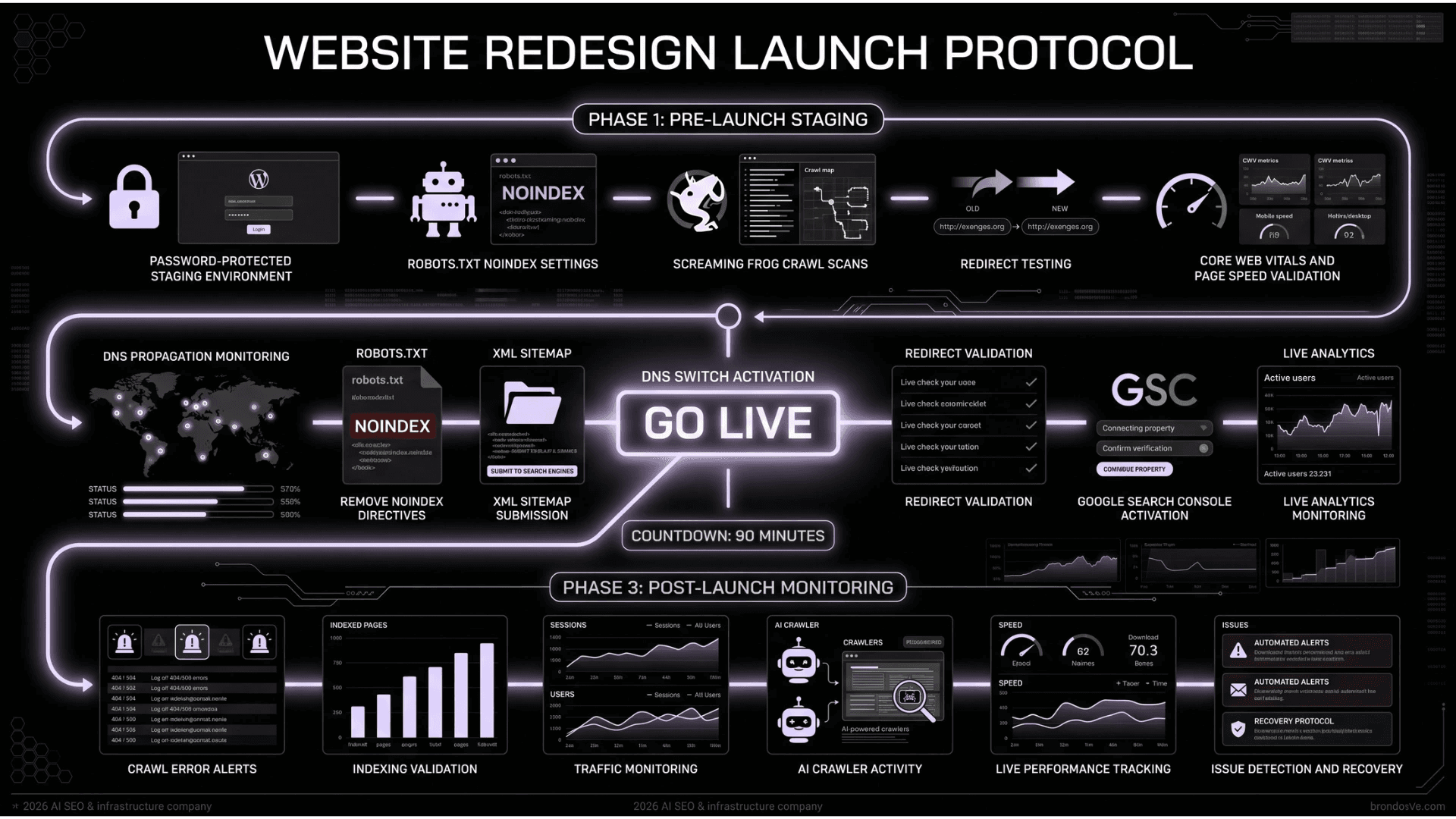
The following staging phase items must be completed and signed off on before any go-live decision is made, regardless of timeline pressure from stakeholders:
-
Build and test on a password-protected staging environment that mirrors the production server configuration
-
Set staging to noindex in robots.txt and confirm in writing that this is removed before go-live
-
Run a full crawl of staging using Screaming Frog before launch sign-off
-
Test all 301 redirects by crawling the complete redirect map, not a sample
-
Check page speed scores in staging: do not wait until after launch to find performance regressions
The 90 minutes immediately after the DNS switch are the highest-leverage window in the entire project, and the following launch day items must be executed in sequence by named owners:
-
Remove noindex from robots.txt immediately after switching live
-
Submit updated XML sitemap to Google Search Console and Bing Webmaster Tools
-
Set up Search Console alerts for crawl errors and coverage drops
-
Monitor Google Analytics in real time for the first two hours
-
Run a live crawl within 24 hours to catch issues that did not appear in staging
The table below assigns pre-launch and post-launch responsibilities by role so every team member knows exactly what they own before the switch is flipped and what they are accountable for in the hours that follow:
|
Role |
Pre-Launch |
Post-Launch |
|
SEO lead |
Redirect map, metadata, and schema confirmed |
Monitor Search Console, track rankings |
|
Developer |
Staging mirrors production, redirects tested |
Remove noindex, submit sitemap, fix errors |
|
Project manager |
Sign-off checklist complete |
Coordinate a 90-minute launch window |
|
Analytics lead |
GA4 and Search Console configured |
Monitor real-time traffic, flag anomalies |
Post-Launch Monitoring: What to Track in the First 90 Days
Launch day is not the finish line. The first 90 days are when ranking fluctuations, crawl errors, and traffic losses either get caught early or compound into a real problem. Kosmoweb's 2026 migration analysis confirmed organic traffic should be within 5% of pre-migration levels by the end of month one when redirects and on-page signals are handled correctly.
The following metrics are what matter most when monitoring weekly for the first 90 days, separated from the noise that is easy to misread in the weeks immediately after a redesign goes live:
-
Organic traffic versus the same period from the previous year: month-over-month is misleading during re-indexing
-
Google Search Console coverage report: watch for excluded pages that should be indexed
-
Core Web Vitals field data from the Chrome User Experience Report, not just lab data
-
Crawl errors and 404s: one missed redirect on a high-authority page costs measurable link equity
-
Keyword ranking changes for the top 20 to 30 priority pages against pre-launch baselines
The table below breaks the first 90 days into five defined monitoring windows, each with a primary focus, the key signal to watch, and a clear action to take if that signal points in the wrong direction:
|
Timeframe |
Primary Focus |
Key Signal |
Action if Wrong |
|
Days 1 to 7 |
Crawl errors and redirects |
404s in Search Console |
Fix missed redirects immediately |
|
Days 7 to 21 |
Indexing and ranking stabilization |
Coverage report |
Investigate noindex or schema errors |
|
Days 21 to 30 |
Traffic recovery curve |
Organic sessions vs. prior year |
Audit redirect map for missed URLs |
|
Days 30 to 60 |
Core Web Vitals |
Field data from CrUX |
Optimize images, caching, and server response |
|
Days 60 to 90 |
Full baseline comparison |
Organic traffic, conversions, CTR |
Identify content gaps from the redesign |
A website redesign SEO checklist does not end at launch. The monitoring phase is what separates a complete process from a half-finished one. This section is the part that most website redesign checklists for businesses leave out entirely. Treat it as non-optional.

What Teams Get Wrong About Website Redesigns
The following addresses the questions that come up most consistently, with the context needed to act before the launch window, not after.
What should be included in a website redesign checklist?
A complete checklist covers five phases: pre-redesign audit, SEO migration, AI crawlability, staging and launch protocol, and post-launch monitoring. Most teams only plan for the middle three and skip the audit and monitoring phases entirely. At WellsGroup, every redesign engagement is built around all five, because the phases most teams skip are the ones that determine whether traffic recovers or doesn't.
How do I protect my SEO rankings during a website redesign?
Start with a full crawl of your existing site, map every URL to its new equivalent, implement 301 redirects before launch, and verify all on-page signals post-launch. The protection is in the planning, not the platform. WellsGroup builds redirect maps and SEO migration protocols before a single design decision is made, not after.
What is an AI crawlability audit, and why does it matter before a redesign?
An AI crawlability audit confirms your redesigned site is accessible to AI retrieval crawlers, including GPTBot, PerplexityBot, ClaudeBot, and Google-Extended. In 2026, these systems are making 3.6 times more requests than traditional search crawlers. A redesign that accidentally blocks them removes your content from AI-generated answers, which is an increasingly significant visibility and traffic channel.
How long does it take to recover SEO after a website redesign?
When redirects and on-page signals are handled correctly, organic traffic should return to within 5% of pre-launch levels within 30 days. When they are not, recovery can take six months or longer. The difference is almost always in the planning that happened before launch, not the fixes applied after. WellsGroup monitors recovery data for 90 days post-launch on every engagement.
What is the biggest SEO mistake companies make during a website redesign?
Changing URL structures without a complete redirect map. A single missed redirect on a high-authority page can eliminate years of accumulated link equity overnight. The second most common mistake is treating SEO as a post-launch task rather than a pre-launch requirement. WellsGroup integrates SEO architecture into the redesign process from day one, not as an afterthought.
Do I need to resubmit my sitemap to Google after a redesign?
Yes, always. Submitting an updated XML sitemap to Google Search Console and Bing Webmaster Tools immediately after launch signals the new URL structure and accelerates re-indexing. It is one of the highest-leverage actions in the 90-minute post-launch window and takes less than five minutes to complete.
Rankings Do Not Protect Themselves
A website redesign done right does not have to cost traffic. But it will not protect itself. Every ranking, every redirect, every AI crawlability signal needs someone to own it before the new site goes live.
The companies that come out of a redesign stronger treated it as a systems project with defined owners, documented baselines, and a monitoring protocol that runs for 90 days after launch, not 90 minutes.
Pick one phase from this checklist: pre-audit, SEO migration, AI crawlability, staging, or post-launch monitoring. Assess where your current plan is thinnest. That is where to start.