Business Automation: What It Covers, What It Costs, and How to Start
Business automation removes the manual work slowing your growth. WellsGroup breaks down what it covers, which tools work, and how to get started.

It is 11 PM, and a small business owner is copying invoice data from an email into a spreadsheet, line by line, one entry at a time. Every entry is a potential error. Every hour spent here is an hour not spent on work that actually grows the business.
This is the problem business automation is built to solve, not replacing people, but removing tasks that should never require human attention in the first place. Business automation is the use of software or systems to complete repetitive processes without manual input, covering everything from a single email auto-responder to complex multi-platform automated business processes that span entire departments.
McKinsey's November 2025 report found that 57% of U.S. work hours are already automatable with currently existing technologies, nearly double McKinsey's own 2023 estimates. This article walks through what automation actually covers, where the highest-value opportunities are, which tools exist, and how businesses of every size are using it right now in 2026.
What Business Automation Actually Covers
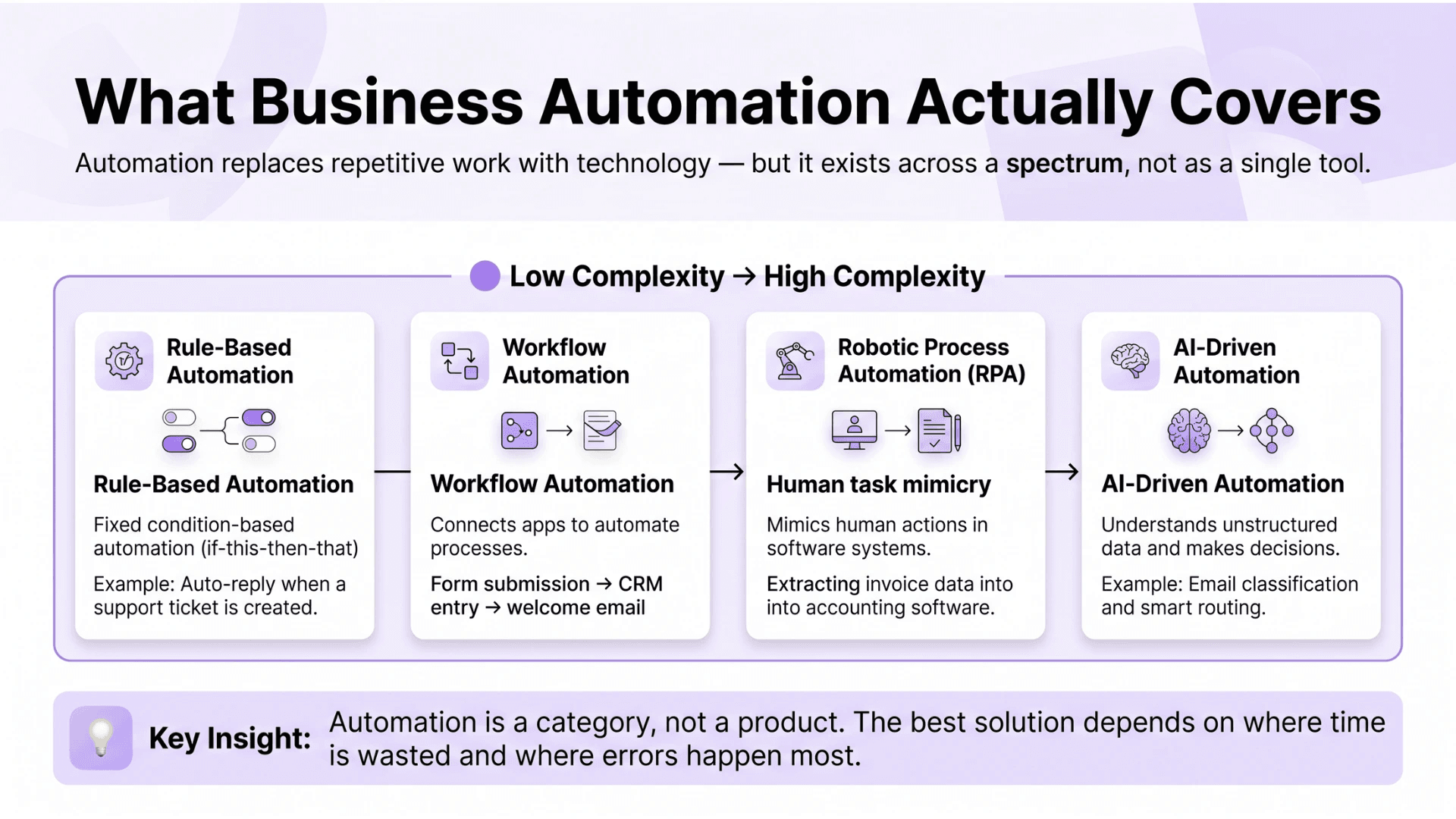
Business process automation is the use of technology to execute recurring tasks where manual effort can be replaced. It is not a single product, and it is not the same as full AI. Some automation is simple rule-based logic; if one condition is met, a specific action follows automatically.
The spectrum ranges from basic triggers to sophisticated multi-system business automation workflows that span departments and customer journeys. The table below maps the major automation types by function, example, and complexity:
|
Automation Type |
What It Does |
Example Use Case |
Complexity |
|
Rule-based automation |
Executes fixed if-then logic |
Auto-reply when a support ticket is created |
Low |
|
Workflow automation |
Connects apps to move data or trigger actions |
Form submission creates a CRM contact and sends a welcome email |
Low to medium |
|
Robotic Process Automation (RPA) |
Mimics human interaction with software |
Extracting invoice data into an accounting system |
Medium |
|
AI-driven automation |
Reads unstructured data and makes decisions |
Categorizing emails by intent and routing them automatically |
High |
The right approach depends entirely on which processes consume the most time and generate the most errors. Automation is a category, not a product, and choosing the wrong category is as common as choosing no automation at all.
Where Manual Work Hurts Businesses the Most
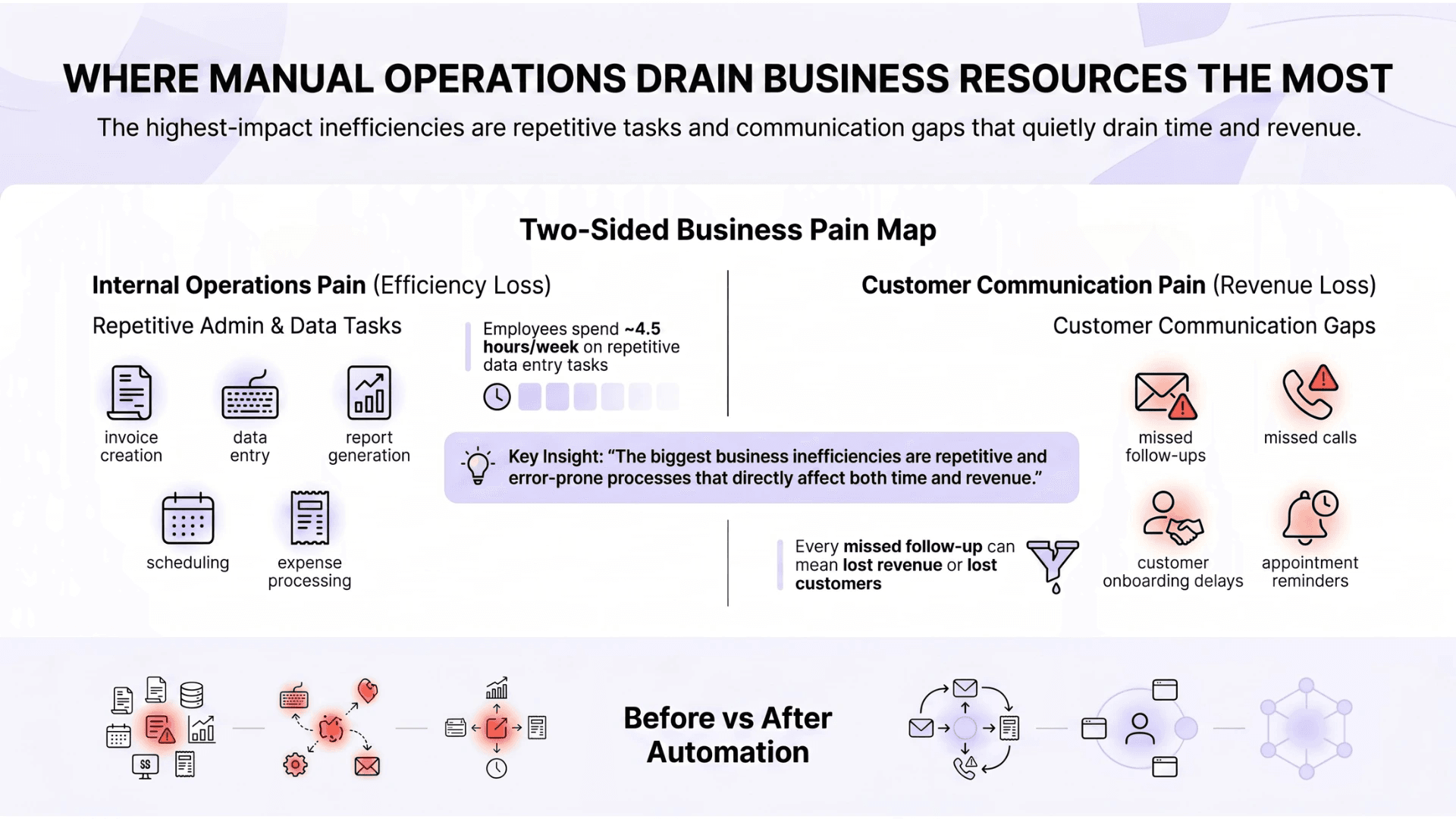
Before selecting any tool, a business needs to identify where manual work creates the most drag. The highest-pain processes share two characteristics: they are repetitive, and they are error-prone.
Repetitive Admin and Data Tasks
Data entry, invoice processing, report generation, and scheduling are among the most time-consuming and error-prone manual tasks in any business, and among the easiest to automate once the process is clearly mapped.
Zapier's State of Business Automation research found that 94% of knowledge workers perform repetitive tasks weekly, with the average employee wasting 4.5 hours per week on data entry alone. Once these are handled as automated business processes, the time savings and error reduction are immediate and measurable.
The tasks that consistently absorb the most time across small and mid-sized businesses include:
-
Manual invoice creation and follow-up
-
Copying data between software platforms
-
Generating weekly or monthly reports
-
Scheduling meetings and sending reminders
-
Processing expense reports
Customer Communication and Follow-Up
For small business automation, the highest-revenue impact usually comes from fixing communication gaps, not internal efficiency. A missed follow-up email or a lead left waiting 48 hours each represents direct revenue loss.
This is where tools like an automated phone answering system for small businesses move from optional to operationally necessary. Every missed call in a business without a dedicated support team is a potential customer who found a competitor instead.
Communication tasks that most consistently slip without automation include:
-
Follow-up emails after inquiries or purchases
-
Appointment reminders and confirmations
-
Customer onboarding sequences
-
Responding to missed calls with immediate acknowledgment
Types of Business Process Automation Tools Available Today
The market for business process automation tools has expanded significantly. Understanding the tool categories prevents overspending on platforms that solve the wrong problem. The table below maps each category to what it automates, who benefits most, and the most common platforms:
|
Tool Category |
What It Automates |
Best For |
Example Platforms |
|
Workflow automation |
Cross-app triggers and data movement |
Any team with manual handoffs between tools |
Zapier, Make |
|
CRM automation |
Lead nurturing, pipeline management, follow-up |
Sales and customer success teams |
HubSpot, Salesforce |
|
AP automation |
Invoice processing, approvals, and payments |
Finance teams handling high invoice volume |
Bill.com, Tipalti |
|
RPA tools |
Repetitive UI-based tasks across legacy systems |
Operations teams working with non-API systems |
UiPath, Automation Anywhere |
|
AI-powered tools |
Content generation, classification, and data extraction |
Teams handling unstructured inputs at scale |
ChatGPT integrations, Notion AI |
|
Communication automation |
Call routing, email sequences, support ticketing |
Customer-facing teams |
Aircall, Intercom |
For accounts payable specifically, the best AP automation software for small business does not need to be the most expensive option. It needs to connect to existing accounting software and reduce the manual approval chain.
When evaluating any automation tool, these criteria consistently separate tools that get adopted from tools that get abandoned:
-
Native integrations with the current tech stack
-
Ease of setup without developer support
-
Clear pricing with no hidden per-seat fees
-
Scalability as the team size or volume grows
-
Quality of support documentation and response time
A note on business process automation software: most businesses end up running two to four tools that each handle a different part of the operation. The goal is a connection between the right platforms, not consolidation into one.
How AI Is Changing Business Automation Right Now
AI has added a distinct layer on top of traditional automation that changes what is possible for businesses well below the enterprise threshold. The distinction between rule-based automation and AI business automation is a fundamental capability difference, not a marketing one.
What AI Adds That Rule-Based Automation Cannot
Traditional automation follows fixed rules. AI business automation adds judgment; it reads unstructured data, detects patterns, and makes decisions that would previously require a person to review and act on.
Capabilities specific to AI-powered automation that rule-based systems cannot replicate:
-
Reading and categorizing incoming emails by intent without keyword matching
-
Extracting data from scanned documents or PDFs without structured formatting
-
Predicting which leads are most likely to convert based on behavioral signals
-
Flagging anomalies in financial data before they become compliance issues
-
Generating draft responses or reports from raw data inputs
Grand View Research's March 2025 report projects the global AI market to reach $1,811.75 billion by 2030 at a CAGR of 36.6%. The businesses entering that market fastest are not the largest enterprises; they are the ones building AI-assisted workflows into functions that previously required dedicated headcount.
Current Trends Shaping Business Process Automation
Three trends are driving where business process automation trends are heading in 2026: hyperautomation, AI copilots embedded in everyday tools, and no-code platforms that let non-technical teams build workflows without IT dependency. A three-person team can now run workflows in 2026 that previously required a dedicated operations hire.
Key trends shaping what is available and accessible right now:
-
Hyperautomation combining RPA, AI, and process mining into unified systems
-
Embedded AI inside tools like Microsoft 365, Notion, and Salesforce
-
No-code workflow builders reducing IT dependency for non-technical teams
-
Compliance automation gaining priority in finance, healthcare, and legal
-
Process mining tools automatically identify automation opportunities from operational data
What Results Businesses Are Actually Seeing
The clearest way to cut through the noise on automation is to look at what business process automation case study data actually shows, not vendor marketing, but documented outcomes.
Documented outcomes across business types:
The following outcomes are drawn from third-party reported data across industries, not vendor marketing or projected estimates. Each example reflects a real operational function where automation replaced a high-friction manual process.
|
Business Type |
Process Automated |
Time Saved |
Error Reduction |
|
Healthcare admin |
Patient intake and scheduling |
60% reduction in admin time |
Near-zero scheduling conflicts |
|
eCommerce |
Order processing and fulfillment |
50% faster processing cycle |
90% fewer manual errors |
|
Financial services |
AP workflow and invoice approval |
30 to 50% faster invoice cycles |
85% reduction in duplicate payments |
|
Logistics dispatch |
Job assignment and confirmation |
40% faster dispatch time |
Significant reduction in missed assignments |
|
Legal |
Contract review and clause flagging |
70% reduction in review time |
Consistent clause identification |
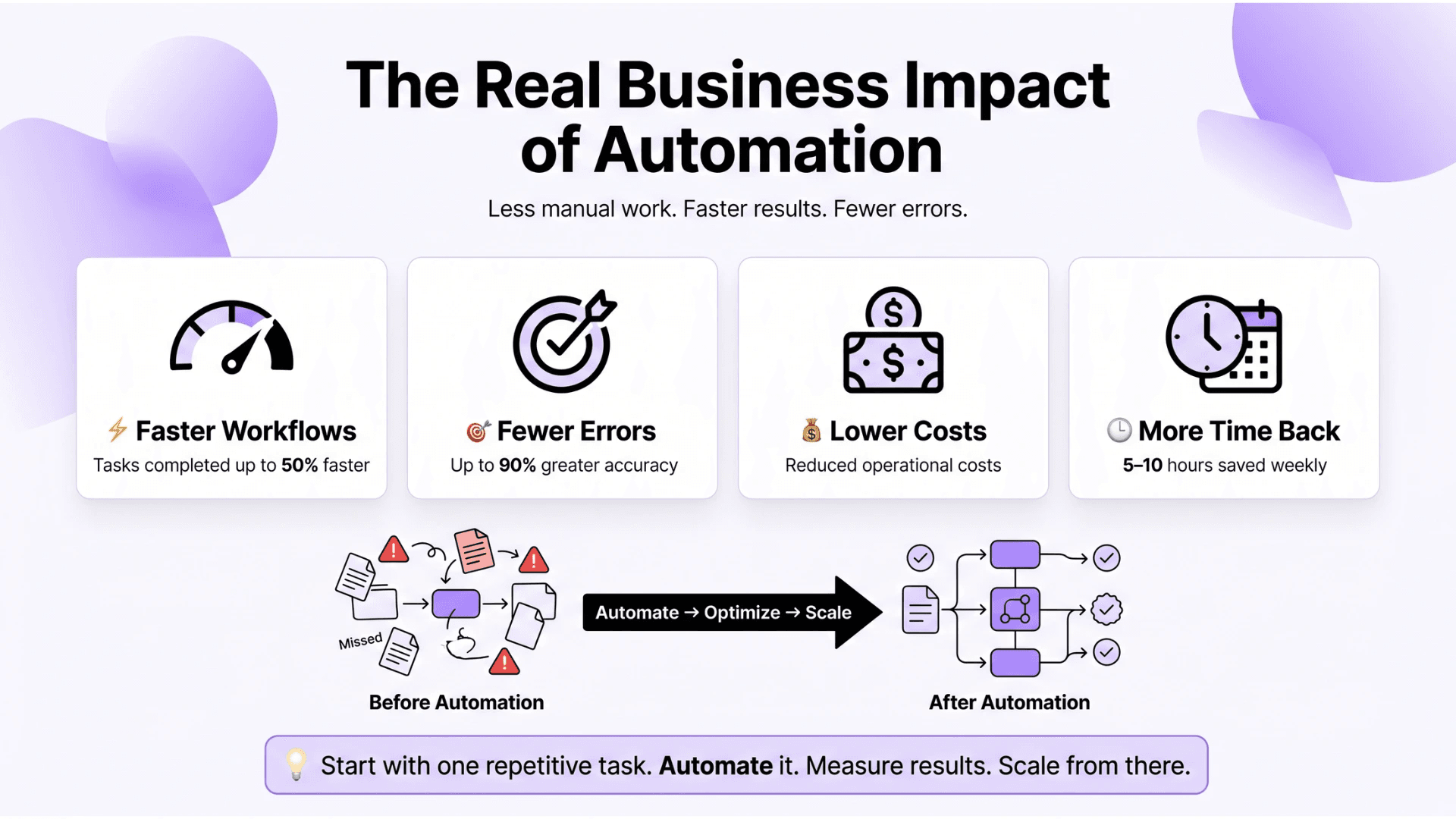
The benefits of business process automation show up in two places, first for small businesses: fewer billing errors and faster customer response time. Common documented outcomes across automation adoption include:
-
60 to 80% reduction in time spent on manual data entry
-
30 to 50% faster invoice processing cycles
-
Up to 90% fewer errors in repetitive data tasks
-
Customer response time reduced from hours to minutes
-
5 to 10 hours per employee per week reallocated to higher-value work

How to Start Automating Without Overcomplicating It
The biggest mistake businesses make is attempting to automate everything at once. Start with one broken process, fix it completely, then move to the next.
A simple starting framework that applies regardless of business size or industry:
-
List every repeated task the team does weekly
-
Sort by time spent and error frequency
-
Pick the single most painful process as the first project
-
Find a tool that solves that process specifically
-
Run it for 30 days and measure before and after
-
Scale to the next process only after the first is stable
When internal expertise is limited, a business automation consultant can map existing workflows and identify the highest-value opportunities without requiring a full platform overhaul, consistently cheaper than purchasing software the team does not adopt.
Forrester's 2023 Global Digital Process Automation Survey found that 56% of organizations consider process improvement a strategic investment and 71% report end-to-end automation as a primary operational driver. Those who engaged structured implementation partners reported significantly higher project completion rates.
For teams evaluating business process automation services, the key question is not "what can this service automate?", it is "does this service understand our specific process bottlenecks?" When evaluating a business process automation company, look for:
-
Workflow audit before any tool recommendation
-
Phased implementation plan with defined milestones
-
Team training and documentation included
-
Named references from similar businesses
Buying Into Automation: Build, Buy, or Partner
There are three ways to get an automated business: build it from scratch, partner with business process automation companies to implement it, or acquire a business that already runs on automated systems.
|
Approach |
Time Investment |
Upfront Cost |
Best For |
Risk Level |
|
DIY tool stack |
High |
Low to medium |
Teams with technical capability and time |
Medium |
|
Managed service or BPA company |
Low |
Medium to high |
Businesses needing results without internal expertise |
Low when vetted properly |
|
Acquiring an automated business |
Low operational ramp |
High |
Investors wanting cash flow without building systems |
Medium |
Buying an automated business for sale is increasingly popular among investors who want operational cash flow without building from zero. Platforms like Acquire.com and Empire Flippers list automated businesses where core operations already run on configured workflows.
Before acquiring, verify these due diligence items:
-
Which tools run the automation and whether licenses transfer
-
How dependent workflows are on a specific individual
-
Whether automation handles edge cases or needs frequent manual override
-
Customer support coverage, especially if the business uses an automated phone answering system
What Business Owners Are Getting Wrong About Automation
These are the questions that come up most consistently when businesses start evaluating automation, answered directly, without the vendor spin.
What is business process automation, and how does it work for small businesses?
Business process automation is the use of software to complete repetitive tasks without manual input, invoicing, follow-ups, scheduling, and data entry. For small businesses, it works best when applied to one high-friction process at a time. WellsGroup identifies which processes are costing the most before recommending any tool, because the starting point determines whether automation actually sticks.
What are the best business process automation tools available in 2026?
The right tool depends on the process being automated. Zapier and Make handle cross-app workflows. HubSpot and Salesforce handle CRM and lead nurturing. Bill.com and Tipalti handle accounts payable. UiPath handles RPA for legacy systems. There is no single best tool; there is the right tool for the specific bottleneck. WellsGroup evaluates the existing tech stack before recommending anything new.
How much does it cost to hire a business automation consultant?
Most small business engagements run between $2,000 and $15,000 for a workflow audit, tool recommendation, and implementation support. That is almost always lower than the cost of purchasing the wrong software and starting over. WellsGroup scopes every engagement around documented process requirements so the investment has a defined return before work begins.
Can I automate my entire business using AI tools?
Not entirely, and attempting to do so is one of the most common reasons automation projects fail. AI business automation handles unstructured data and judgment-based decisions. Rule-based workflow automation handles structured, repeatable tasks. Most businesses need both, layered correctly. The goal is a business where manual work is the exception, not the elimination of every human touchpoint.
What is the difference between RPA and AI business automation?
RPA mimics human interaction with software, clicking, copying, and entering data faster and without errors. AI business automation reads unstructured inputs, detects patterns, and makes decisions that would previously require human judgment. RPA suits structured tasks in legacy systems. AI automation suits variable inputs like emails and documents. Most mature automation systems use both in combination.
The Right Automation Decision for Your Business
Business automation is not a technology decision. It is an operational one. The question is not "should we automate?", it is "which processes cost us the most in time and mistakes right now?"
If data entry is consuming hours weekly, start with workflow automation tools like Zapier or Make. If leads are slipping, start with CRM and communication automation. If invoicing is eating finance hours, look at dedicated AP automation platforms first.
For businesses without internal expertise, a business automation consultant is almost always cheaper than buying software that the team does not adopt. For those ready to scale, partnering with a business process automation company for a full workflow audit is the most complete path forward. For those who want a turnkey operation, automated businesses for sale through platforms like Acquire.com are worth evaluating.
The businesses that benefit most are the ones that have mapped their manual processes honestly and addressed them one at a time.